
How do I search my bookmarks in Chrome?
Open the bookmark manager with Ctrl+Shift+O (Cmd+Option+B on a Mac). At the top is a search box, Search bookmarks. Type a word from the title or from the address, and the list narrows to the bookmarks that contain it. A word from the address works because the search looks at both; a folder name finds the folder itself, not what is inside it.
Short, distinctive words work best. If you saved a recipe from a site you remember, try the site’s name before the dish.
Can I search bookmarks from the address bar?
Yes. Click the address bar, type @bookmarks, press Tab or the space bar, and then type a word from the bookmark’s name. Chrome lists the matches under the address bar, and you open one by picking it. Google describes the search as matching the bookmark’s name.
@bookmarks is one of Chrome’s built-in shortcuts for searching inside the browser, next to @history and @tabs. You can see the list at chrome://settings/searchEngines, under Manage search engines and site search.
Why can’t Chrome find a bookmark I know I saved?
Go through the usual causes:
- You are searching for the page, not the bookmark. The bookmark search matches the title and the address of what you saved. Google does not document a search of the page’s text, so a phrase from inside the article may find nothing.
- The bookmark has a different name. A bookmark can be renamed, and sites often name pages in ways you do not expect. Search for a word from the address as well.
- You are in another Chrome profile. Each profile has its own bookmarks, so check the profile icon next to the address bar.
- The bookmark never reached this computer. If your browser syncs bookmarks and sync is off or paused, a bookmark you saved on another device is not here yet.
How do I find which folder a bookmark is in?
Search for it in the bookmark manager. Chrome offers Show in folder for a search result, and that takes you to the folder that holds it, so you can see its neighbors and move it if it is in the wrong place.
Is there a faster way to open a bookmark?
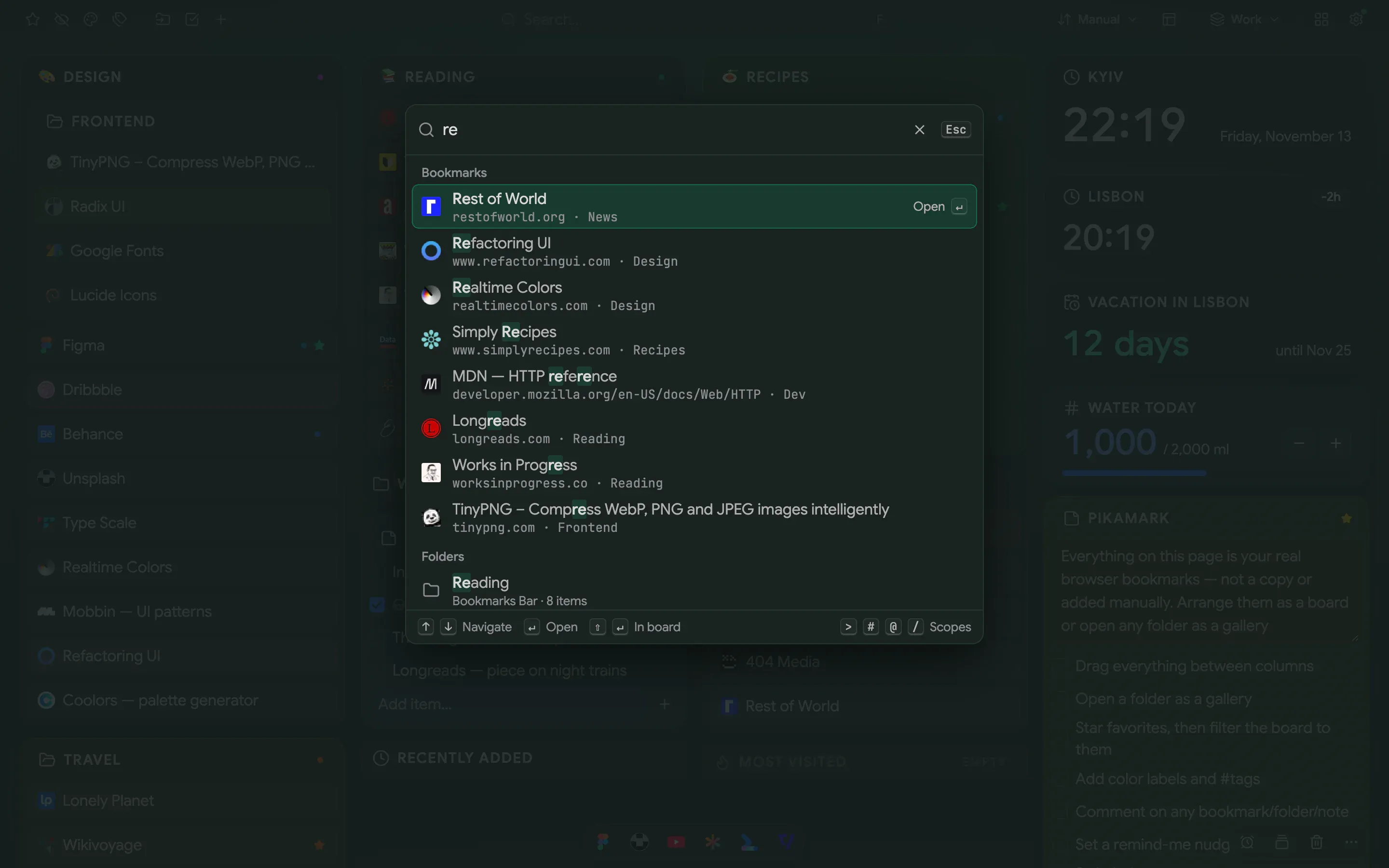
Yes, if you want to open it rather than study it. Pikamark is a new tab extension that shows your bookmarks as a board, and the same bookmarks are behind a command palette. On the new tab, press F, type a few letters of the name or address, and press Enter. It finds bookmarks, folders and notes. Shift+Enter shows the result on the board instead of opening it.
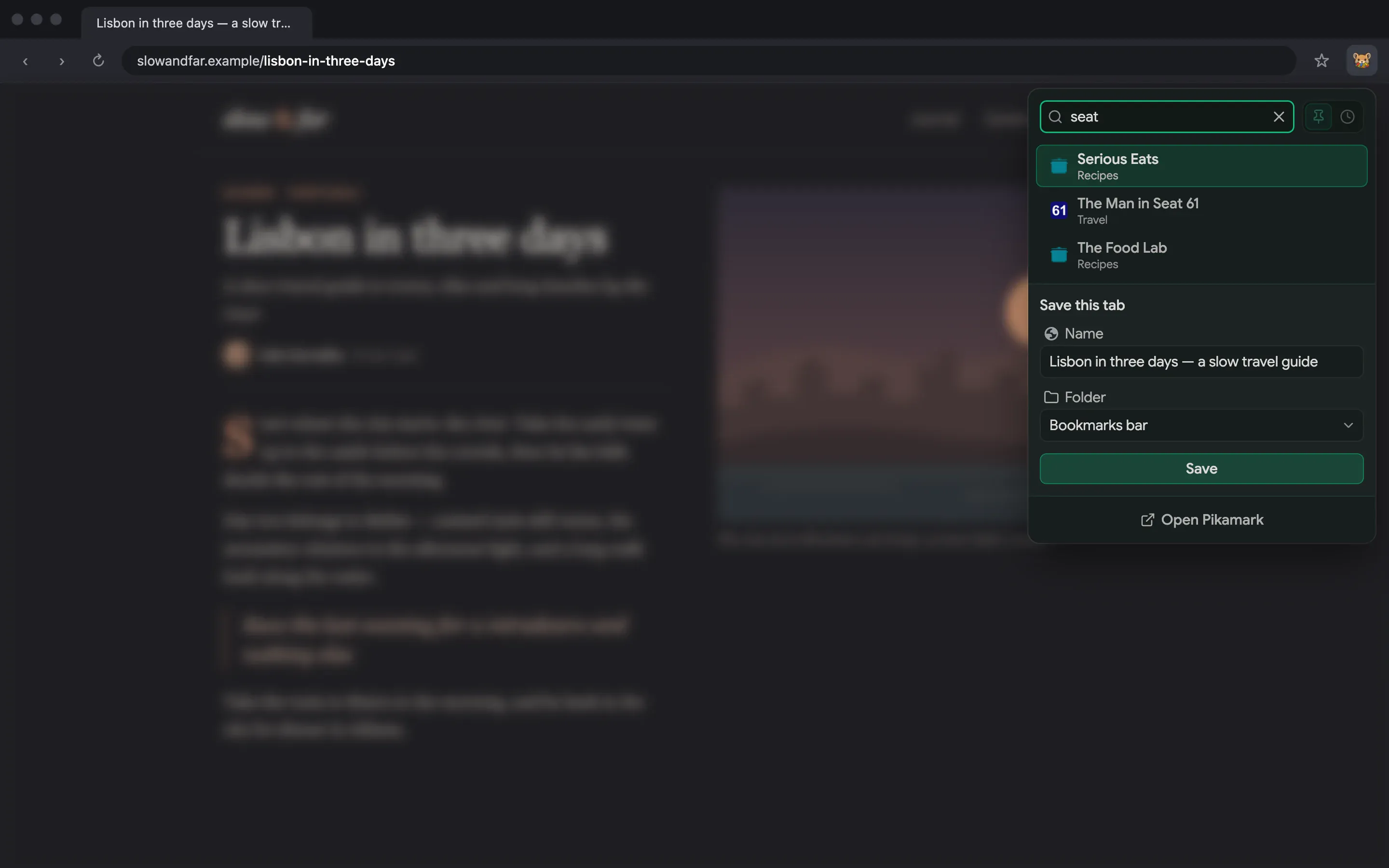
On any other page, the toolbar popup does the search: pin Pikamark’s icon, click it, type, move through the results with the arrow keys and press Enter. Each result shows the folder it is in.
The command palette and the popup search are part of the free core, with no account, no item caps and no ads. Pro is optional and adds tags, comments and reminders, workspaces, pinned links, backgrounds and automatic backups. The Pricing page has the details.
| Method | How to open it | What it searches | Shows the folder |
|---|---|---|---|
| Chrome’s bookmark manager | Ctrl+Shift+O (Cmd+Option+B on a Mac) | Title and address | Yes, with Show in folder |
Address bar @bookmarks |
Type @bookmarks, then Tab or the space bar |
The bookmark’s name, as Google describes it | Not in the list |
| Pikamark command palette | F on the new tab | Name and address, for bookmarks, folders and notes | Shift+Enter shows it on the board |
| Pikamark toolbar popup | The toolbar icon, on any page | Bookmarks | Yes, the folder name under each result |
If your bookmarks are in a mess, How to organize a large bookmark collection in Chrome walks through the clean-up with Chrome’s own tools first. If you use Edge or Firefox, see the Edge guide or the Firefox guide.
Does Pikamark send my bookmarks anywhere?
Pikamark stores notes, tags and settings locally, without extension analytics or tracking. Your browser can sync bookmarks. Pro licensing contacts Freemius after activation, with validation, renewal checks and retries; Firefox can load site icons, which you can disable in Settings. Links and web searches you open contact their destinations, while checkout is an external Freemius service. The Privacy policy explains these connections and every permission.

 Chrome
 Edge
 Firefox
 Brave
 Vivaldi
 Opera